Voice & Transcribe - QuickVox
- 4.4
- Rating
- 100.00K
- Installs
- Free
- Price
 Analysis by App-foxy
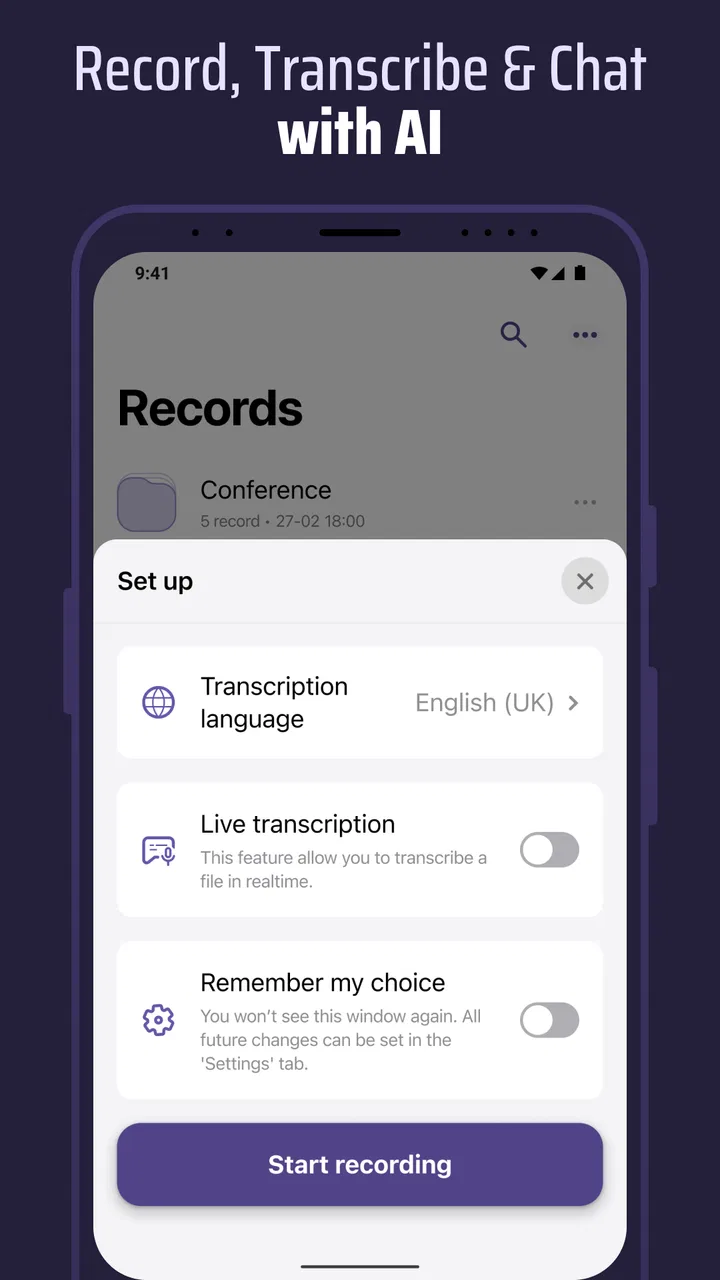
I installed Voice & Transcribe - QuickVox expecting a straightforward recorder, but its more interesting idea is bringing live speech-to-text and speaker recognition into the same productivity workflow. That combination makes a strong first impression because it reduces the gap between hearing something useful and having words you can search, copy, or organize later. I found it most appealing when I wanted to stay involved in a conversation instead of constantly stopping to type.
It is a free productivity app from B1 Group OU, available for users aged Everyone. Its current version is 1.0.73, and it runs on Android 7.0 or later. The app has reached over 100 thousand installs and holds a 4.4 average from around 751 ratings, which suggests that the basic concept is connecting with a meaningful group of users. The important question, though, is not whether live transcription feels impressive during the first session. It is whether the result is useful enough to become part of a routine.
From an impressive first session to a dependable routine
During the first week, the appeal is easy to understand. A voice recorder alone preserves sound, while a transcription tool turns speech into text, and QuickVox tries to make both parts available in one place. That matters when I am capturing an idea, recording a discussion, or reviewing something later. I do not have to choose between keeping the original audio and creating a readable version at the moment I start.
You May Also Like

 Blood Strike: 2.5 Anniversary
Blood Strike’s Loadouts Turn Every Drop Into a Tactical Gamble
A close look at Blood Strike’s custom loadouts: how fast access to signature weapons reshapes its battle royale rhythm, rewards preparation, and narrows the gap between fights.

 Pandora - Music & Podcasts
Pandora’s Music Is Easy to Start, but Harder to Recover
Pandora’s strength is its low-effort path from a seed to a station. Its weak spot is how much confidence it asks you to place in connection, setup, and quiet recovery.

 8 Ball Pool
 Is Built on Rivalries, Rematches, and Routine
A close look at the rivalries, rematches, shared routines, and unanswered safety questions that turn a quick pool match into a persistent mobile community.

 Samsung Music
’s Quiet Strength Is Playing What You Already Own
Its reach comes less from spectacle than from dependable access to a personal library. That simplicity is both the app’s strongest retention engine and its ceiling.

 AccuWeather: Weather Radar
AccuWeather Review: A Quick, Clear Forecast for Everyday Decisions
For everyday plans, the best forecast is the one you can understand quickly. AccuWeather makes rain timing, radar, and local conditions easy to act on, with a few trade-offs.

 Hill Climb Racing
Why Hill Climb Racing Still Turns Crashes Into One More Run
A tiny car, a bumpy hill and one more upgrade: Hill Climb Racing keeps resurfacing because its simple chaos makes every near-miss feel personal.
More From Our News Desk
View All News


The speaker recognition angle is especially useful in conversations with more than one person. A plain transcript can become difficult to follow when several voices alternate, because the words may be accurate but the ownership of each statement is unclear. Identifying speakers gives the written record more structure. I would still treat the result as a draft rather than a formal record, but the distinction between voices can make review much less tiring.
A realistic everyday example is a short planning conversation at work. Instead of trying to write every task while someone else is speaking, I can focus on the discussion and let the app create a working transcript. Later, I can replay the recording when a sentence seems unclear and use the text to locate the section I need. That workflow is more practical than relying on memory, and it is more flexible than a handwritten page that captures only what I managed to notice.
The same approach works for personal reminders, interviews, study notes, and spoken drafts. I found the app more valuable when I gave each recording a clear purpose before starting. “Capture this meeting so I can verify action points” is a better use than recording everything without a plan. Transcription creates information quickly, but it does not automatically decide what deserves attention.
One of the less obvious strengths is that audio and text serve different jobs. The transcript is faster to scan, while the recording gives me the original tone and context. If a sentence looks strange, the audio can help me decide whether the problem is a recognition error or an ambiguous statement. This makes the combination more trustworthy than text alone, provided I am willing to check important passages.
That last condition is important. Speech recognition can struggle with background noise, interruptions, unusual names, accents, overlapping voices, or people speaking too quickly. I would not use an unedited transcript as the sole source for legal, medical, academic, or business-critical decisions. QuickVox can reduce the effort needed to create notes, but it does not remove the responsibility to review them.
For a first-week test, I recommend trying three different situations rather than judging it after one quiet recording. Use it for a solo voice note, a conversation with alternating speakers, and a noisier real-world setting. This quickly reveals whether the app fits your voice, environment, and preferred way of reviewing information. It also prevents the common mistake of assuming that an impressive demonstration represents every recording condition.
Where the app feels more useful than a standard recorder
A normal recorder is excellent when preserving sound is the only goal. It is simple, familiar, and often less demanding during capture. QuickVox earns its place when I need to do something with the content afterward. Reading a transcript can be faster than listening through an entire recording, especially when I am looking for a particular decision, phrase, or reminder.
It also has an advantage over typing notes in situations where the conversation moves too quickly. Manual notes force me to summarize while listening, which can cause me to miss the next point. A live transcription workflow lets me concentrate on meaning first and edit later. That is not a replacement for thoughtful notes, but it is a useful safety net for details that would otherwise disappear.
Compared with a dedicated transcription service, the appeal is convenience: recording, text conversion, and speaker-oriented organization are presented as parts of one app. The trade-off is that users who need highly polished transcripts, specialist vocabulary handling, or advanced editorial controls may prefer a more focused professional tool. QuickVox feels aimed at practical everyday capture rather than a complete newsroom or research pipeline.
What keeps the app valuable after the novelty fades
The long-term value depends on whether transcription changes a repeated task. If I use it only to demonstrate that speech can become text, the novelty fades quickly. If I use it to create searchable meeting drafts, capture ideas while walking, or preserve spoken explanations for later review, it has a clearer role. The app needs to save me effort often enough that opening it becomes automatic.
My strongest recurring use would be a two-pass workflow. First, I record and let the app produce a rough written version. Later, I scan the transcript, correct only important errors, and turn the useful parts into short action notes. This is more sustainable than trying to perfect every line. It also respects the app’s real strength: reducing the cost of getting information out of my head and into a reviewable form.
Speaker recognition can add lasting value when the same type of conversation happens repeatedly. For example, a project discussion becomes easier to revisit when I can distinguish the person making a proposal from the person responding to it. That context helps when I am turning a conversation into responsibilities or follow-up questions. I would still verify names and assignments before sharing the result, because a recognition mistake can change the meaning of a note.
Another useful habit is recording short segments instead of one enormous session whenever the situation allows it. Shorter recordings are easier to revisit, and each one can have a clear purpose. A quick idea, a question to research, and a meeting recap do not need to live in the same undifferentiated stream. This is not a flashy feature, but it is the kind of behavior that determines whether a transcription app remains useful or becomes a storage box full of forgotten audio.
The free entry point helps with experimentation. I can test whether live transcription fits my routine before deciding whether it deserves regular use. However, the app includes in-app purchases ranging from $3.99 to $69.99 per item, so anyone planning to depend on it should examine the available purchase options and decide whether the ongoing value matches the cost. I would not pay simply because the first transcription feels impressive; I would pay only if it repeatedly replaces a task I already dislike doing.
The maintenance work that users often underestimate
The main maintenance burden is not starting a recording. It is what happens afterward. Transcripts need checking, useful points need extracting, and old recordings need enough organization to remain findable. Without that second step, QuickVox can produce a growing pile of text that looks productive but does not actually improve my decisions.
I would keep a simple rule: every important recording should end with a small written outcome. That might be three tasks, one question, or a short summary. The transcript remains useful as supporting material, but the outcome becomes the part I actually revisit. This prevents the app from turning into an archive that demands more attention than it saves.
There is also a social maintenance issue. Recording conversations and identifying speakers can affect other people’s comfort and expectations. I would make the recording clear to participants and avoid treating the transcript as an invisible observer. Even when the technical process is easy, responsible use still depends on the setting and the people involved. An app that captures speech should be used with the same care I would apply to any other recording method.
Accuracy management is another recurring task. I would pay particular attention to names, numbers, addresses, deadlines, and short words that can reverse a meaning. A transcript can look polished while containing a small but important error. The safest workflow is to use the text for navigation and drafting, then confirm critical details against the audio.
Storage habits matter too, even though the app’s core attraction is immediate capture. I would avoid recording every passing thought unless I already have a way to review it. A voice-to-text tool makes capturing easy, and that convenience can encourage overcollection. The better question is not “Can I record this?” but “Will I do something with it later?” If the answer is no, the recording may create more maintenance than value.
Where fatigue begins
The first source of fatigue is the gap between a transcript and a finished note. New users may expect the app to deliver polished minutes automatically, but live transcription is better understood as raw material. The more demanding the conversation, the more likely I am to need cleanup. That is acceptable for drafts and reminders, but frustrating if I expect publication-ready text.
A second source is the need to monitor recording conditions. Background noise, people talking over one another, and distant voices can reduce usefulness. A standard recorder may still preserve enough audio to understand what happened, while the text layer becomes messy. In those moments, QuickVox’s extra intelligence is not automatically an advantage; it gives me an additional result to inspect.
Speaker recognition can also create false confidence. Labels make a transcript easier to read, but they do not guarantee that every speaker assignment is correct. In a calm, orderly exchange, the feature can add helpful structure. In a lively group discussion with interruptions, I would treat the labels as assistance rather than proof. This is one of the clearest trade-offs in the app: more organization can mean more apparent certainty than the source actually supports.
There is a practical attention cost as well. If I record too much, I may spend longer reviewing transcripts than I would have spent writing a concise note in the first place. QuickVox is strongest when the spoken material is valuable but difficult to capture manually. It is less compelling for simple tasks that I can type in a few seconds.
Users who need a highly specialized workflow may also feel constrained by the app’s general-purpose focus. Someone producing formal research transcripts, handling technical vocabulary, or managing a large professional archive may want dedicated controls and a broader editing environment. Someone who only wants a private audio memo may find a basic recorder more direct. The app sits between those choices, and that middle position is useful only when I actually need both audio and text.
Who should build a habit around it?
I would recommend it to students who want spoken explanations turned into review material, professionals who need a first draft of meeting notes, interviewers who want audio alongside a readable record, and anyone who thinks more clearly by speaking than typing. It is particularly suitable for people willing to review and edit rather than expecting perfect automation.
It is a weaker fit for users who need instant, publication-ready transcripts with no checking, people who rarely revisit recordings, or anyone whose work depends on exact terminology and flawless speaker attribution. Those users may be better served by a specialized service or a simpler tool with fewer moving parts. QuickVox is not a universal replacement for every recorder, note app, or transcription platform.
The minimum operating system requirement is Android 7.0, which makes the app accessible to many older Android devices. Still, the experience will depend on the phone, microphone, surroundings, and the kind of speech being captured. I would test it on the device and in the environment where I expect to use it, rather than assuming that a good result in a quiet room will carry over to a busy location.
The app’s Everyone content rating also makes it broadly approachable from an age-classification perspective. That does not mean every recording situation is equally appropriate, of course. The responsibility lies in choosing what to record, informing participants when relevant, and handling the resulting text and audio thoughtfully.
My long-term verdict
After the initial excitement, I think QuickVox can earn lasting space on a phone, but only for a user with a repeatable reason to capture spoken information. Its strongest idea is not transcription by itself. It is the pairing of a live written draft, an original recording, and speaker-aware structure in one productivity workflow. That combination can make conversations easier to revisit and ideas easier to preserve.
My recommended approach is to start free, test several real situations, and establish a review habit before considering in-app purchases. Give every recording a purpose, check important details against the audio, and convert the transcript into a small set of actions or conclusions. Those steps turn the app from a novelty into a tool.
QuickVox is worth keeping when it consistently saves you from missing, retyping, or replaying important spoken information. If it only creates more material to sort through, a conventional recorder or a focused note-taking option may be the better choice. In my experience, its lasting value comes from disciplined use: capture selectively, review promptly, and treat the transcript as a helpful working draft rather than the final authority.
For that audience, Voice & Transcribe - QuickVox is a thoughtful productivity companion with a clear everyday purpose. It does not eliminate the work of listening and organizing, but it can move that work to a more convenient stage. That is enough to make it genuinely useful, provided the habit continues after the first week.
FAQs for Voice & Transcribe - QuickVox
01What is Voice & Transcribe - QuickVox used for?
Voice & Transcribe - QuickVox is designed to convert spoken words into written text, making it useful for taking notes, drafting messages, recording ideas, or creating text from conversations. Its main appeal is speed and convenience, especially when typing is impractical. Before downloading, users should check the app’s supported languages, transcription limits, and whether its most useful features require a subscription or in-app purchase.
02How accurate is QuickVox when transcribing speech?
Transcription accuracy can be good when the speaker talks clearly in a quiet environment, but results may vary depending on accents, background noise, speaking speed, and the selected language. Technical terms, names, and overlapping conversations may require manual correction. QuickVox should therefore be treated as a helpful first draft rather than a perfect record, particularly for interviews, meetings, or other situations where every word matters.
03Does Voice & Transcribe - QuickVox require an internet connection?
Whether QuickVox can transcribe completely offline depends on the version of the app and the speech-recognition technology it uses. Many voice transcription services process recordings through online servers, so an internet connection may be necessary for reliable results. Users should review the app’s current store description and permissions before installing, especially if they need transcription while traveling or in places with limited connectivity.
04Is my voice data private when using QuickVox?
Privacy is an important consideration because voice recordings and transcribed text can contain personal, professional, or confidential information. Before using Voice & Transcribe - QuickVox for sensitive conversations, review its privacy policy to understand whether audio is uploaded, how long it may be stored, and whether data is shared with service providers. Avoid recording other people without their knowledge or permission, and check local recording laws.
05Is Voice & Transcribe - QuickVox free to download and use?
QuickVox may be available to download at no initial cost, but some features can be restricted by usage limits, advertisements, premium plans, or in-app purchases. The free version may offer only a limited number of transcriptions or reduced access to advanced tools. Check the Google Play Store or Apple App Store listing for current pricing, trial terms, renewal details, and supported devices before starting a subscription.
Pros
- Converts spoken words into text quickly for notes
- messages
- and documents.
- Simple interface makes recording and transcription easy for first-time users.
- Useful for hands-free writing while commuting
- cooking
- or multitasking.
- Can help users capture ideas without typing on a small phone keyboard.
- Supports a more accessible workflow for people who find typing difficult.
Cons
- Transcription accuracy may drop with background noise or unclear pronunciation.
- Some features may require a subscription or in-app purchase.
- Long recordings can take time to process
- depending on connection and device.
- Sensitive recordings may raise privacy concerns when processed through online services.
- Punctuation and formatting may need manual correction after transcription.

Voice & Transcribe - QuickVox
Gallery